CRM guide for hair transplant and health tourism: from international patient to 12-month follow-up
In health tourism, patients write in different languages, send photos, ask for foreign-currency quotes and expect months of follow-up after the operation. We explain how to tie this process to stages, rules and reminders.
By BEF CRM Ekibi Updated

Contents 8 sections
In hair transplant and health tourism, patients often write from another country, in another language and at night. They send their photos and ask about graft counts and prices; since they’re writing to several clinics at once, they expect a quick reply. The work doesn’t end when the quote is accepted: flights, hotels, transfers, the operation day and then months of checkup follow-up come next.
In this guide, we explain how to tie this process to stages, rules and reminders in BEF CRM. A summary of the preset settings is on the Hair transplant and health tourism page.
Language barriers and night messages
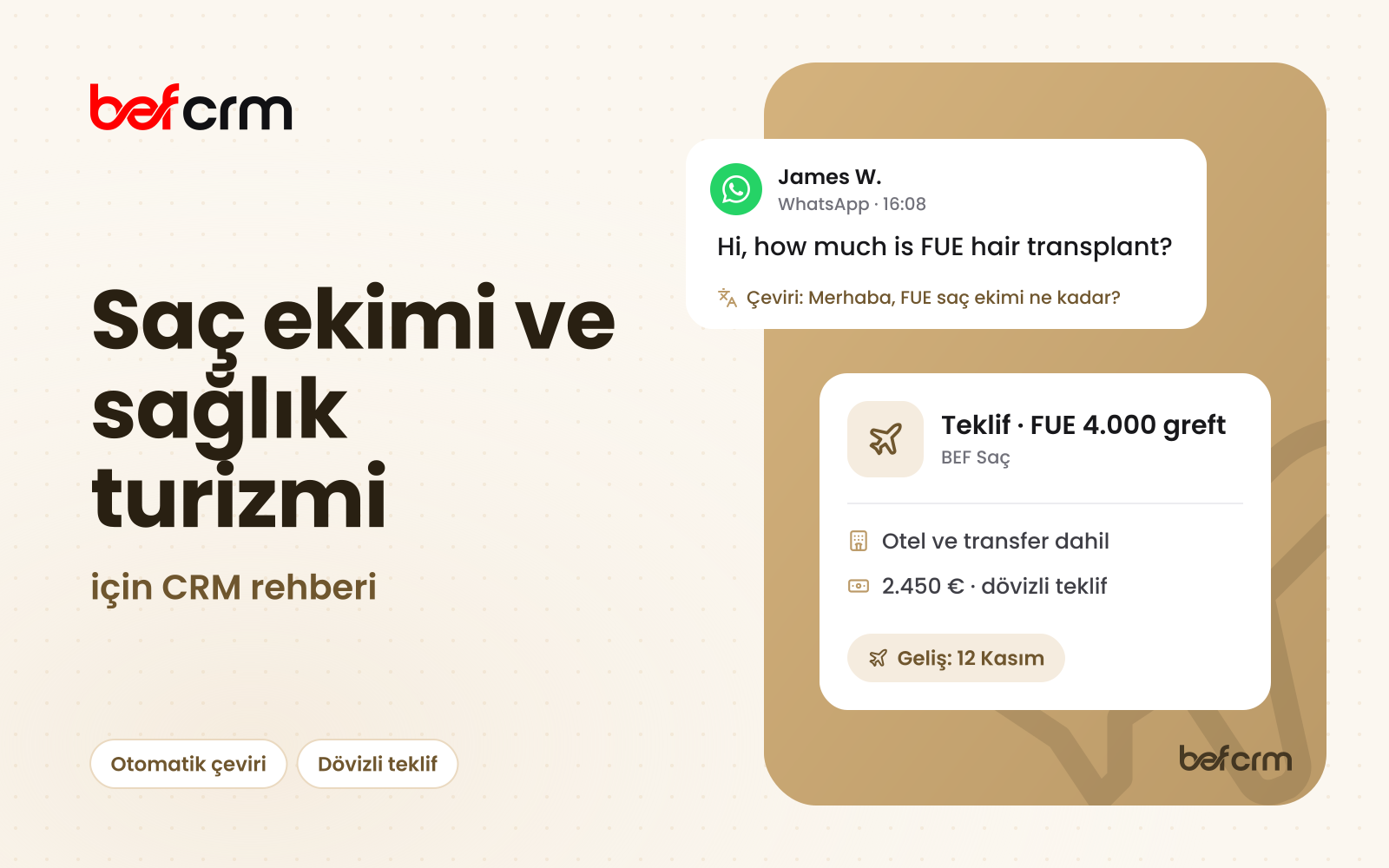
With automatic translation on, the language of an incoming message is detected and its Turkish translation appears below the message. With “Send in the customer’s language” on, the reply you write in Turkish is translated into the patient’s language before it goes out; quick messages are translated too. The original text and the translation are stored together, and each translation counts toward the monthly AI quota. If you have coordinators who speak specific languages, you can distribute requests by language with assignment rules.

The AI assistant can answer messages that arrive at night from your knowledge base: the process, what the package includes (such as hotel and transfer), the photos needed and general information. Graft count, suitability and the exact price, however, should be given after the doctor’s or coordinator’s assessment. The assistant doesn’t offer discounts or make price commitments, and instead of making things up on topics that aren’t in the knowledge base, it hands over to a rep.
Stages and naming
With the industry settings, the board comes with five stages; leads appear as “Prospective patients”, customers as “Patients” and sales as “Operations”.
| Stage | When does a record move here? | Work at this stage |
|---|---|---|
| Info provided | Process and package information shared | Ask for the necessary photos |
| Photo / graft analysis | Photos received, analysis done | Share the suitability decision and the recommended plan with the patient |
| Quote sent | Foreign-currency quote sent via a link | Answer questions and prepare the deposit link |
| Operation date confirmed | Deposit paid, date set | Enter flight, hotel, transfer and interpreter details |
| Operation done | The operation took place and the sale was entered | Start the 12-month follow-up plan |
The online booking form comes with six preset questions (such as “Which country do you live in?”). When the patient’s country and language are on record, both assignment and reporting get easier.

Foreign-currency quotes and deposits
The quote is prepared in euros, dollars or pounds sterling and sent via a link; the patient opens it on their phone and accepts it. The deposit is collected via a payment link; when payment arrives, the operation date is confirmed. The exchange rate is pulled daily from the TCMB, and revenue is also reported by currency. Because the ad campaign the patient came from is written to the record, you see which campaign brought in records and operations.
Close reasons and follow-up
The preset close reasons are: Found the price too high, Insufficient grafts / not a candidate, Can’t travel, Date didn’t work, Chose another clinic.
- Found the price too high: a task is created for the rep in the next campaign period.
- Date didn’t work: a task is created for the rep 30 days later; when you follow up, share new available dates.
- Insufficient grafts / not a candidate: this is the doctor’s decision; don’t create a follow-up task, and write the reason in the note.
- Can’t travel: add your own rule based on the time the patient mentioned.
From the airport to month 12
Sağlık turizmi modülünde uçuş, otel, transfer ve tercüman bilgisi hastanın kaydında durur; operasyon günü programı çıkarılıp hastayla paylaşılır. Operasyondan sonra tedavi planı 12 ay boyunca kontrol adımlarını getirir. Kontrol günlerinde fotoğraflar hasta kaydına eklenir; önce / sonra fotoğrafları belirli günlerde yan yana karşılaştırılır. Hasta triyaj formunda bir şikâyet bildirirse sorumluya anında bildirim gider.

Önerilen modüller: Sağlık turizmi, Tedavi / takip / program planı, Fotoğraf seansları ve önce / sonra, Belirti / şikayet triyajı. Modüllerin ayrıntısı sektör modülleri bölümünde.

International patients and KVKK: not legal advice
Patient photos and health information are special categories of personal data under KVKK. For international patients, the data protection rules of the country where the patient lives may also come into play. Make sure your privacy notice is in a language the patient understands and that data transfers such as translation and AI services are covered in it. In BEF CRM, health fields are stored encrypted, only authorized staff can see them and every access is logged. Determine your obligations with a lawyer; this note is general information.
Ads and campaigns
In health tourism, ads are an important source of patients. On the ad performance screen, you see the results reported by the platform side by side with the real number of records and operations in the CRM; for the reasons behind the gap, see our post on ad conversions versus real sales. Campaign messages go only to people with commercial message consent; also keep in mind the rules on advertising healthcare services.
What to check in the weekly report
- How long messages that arrive at night and on weekends wait.
- Records waiting in the photo / graft analysis stage.
- Records, quotes and operations by ad campaign.
- Revenue by currency, and upcoming operations with a deposit paid.
- Overdue checkups in follow-up plans and triage notifications.
First-week checklist
-
Turn on channels and translation
Connect WhatsApp and Instagram and turn on automatic translation; check it with a few test messages in different languages.
-
Set up assignment by language
Define the languages your coordinators speak and set up assignment rules by language.
-
Enter packages and foreign-currency prices
Enter package contents (hotel, transfer, interpreter) and prices in foreign currency on the Products screen.
-
Prepare the assistant’s knowledge base
Write down the process, the photos needed, package contents and frequently asked questions; add exact prices and suitability decisions to the prohibited topics.
-
Set up the 12-month follow-up plan
Prepare checkup days, photo request steps and the triage form as a template.
Can a rep who doesn’t speak a foreign language reply?
Yes. Incoming messages appear with a Turkish translation; with “Send in the customer’s language” on, the reply you write in Turkish is translated into the patient’s language before it goes out. To make sure critical information such as medical instructions is understood correctly, also share it in a separate written document.
Can I send the quote in euros?
Yes. Quotes can be prepared in euros, dollars or pounds sterling; the exchange rate is pulled daily from the TCMB, and revenue is also reported by currency.
How do I stay in touch with the patient after the operation?
Tedavi planı 12 ay boyunca kontrol adımlarını görev ve mesaj olarak getirir. Fotoğraflar hasta kaydına eklenir; hasta şikâyet bildirirse sorumluya anında bildirim gider.